
Views: 0 Author: Site Editor Publish Time: 2026-09-24 Origin: Site


Compact electronics create a lot of heat. If you don't control that heat, the device won't work well. Synthetic graphite sheets are now a key material for cooling modern gadgets. They move heat quickly across their surface. This stops dangerous hot spots from forming.
Picking the right synthetic graphite sheet takes careful thought. You need to look at several things. Thermal conductivity is the most important. You must know the difference between in- and through- values. Thickness changes how flexible the sheet is and how heat moves through it. Adhesive backing makes installation easier. Cost always plays a part in your choice.
Good thermal management needs a balanced plan. You want to remove heat well without making the device bulky. This guide helps you check each factor for your specific use. You will make a smart purchase that fits your exact needs.
Synthetic graphite sheets spread heat fast across their surface. They stop hot spots in compact electronics.
Check both in- and through- thermal conductivity. In- spreads heat sideways. Through- moves heat through the sheet.
Thin sheets bend easily and fit tight spaces. Thick sheets move more heat but are stiffer.
Coated sheets stop electrical shorts but reduce heat transfer. Bare sheets cool best but need careful placement.
Match the sheet grade to your heat load. Standard grades work for phones. High-performance grades suit EVs and 5G gear.
Use pre-applied adhesive for quick assembly. Choose a separate TIM for maximum heat flow.
Test samples in your device before buying. Datasheets give numbers. Real tests show true performance.
Pick a supplier with strong quality control. Look for ISO9001 and proven production capacity.
You make synthetic graphite sheets by heating materials at very high temperatures and pressing them. This process lines up carbon atoms in a neat, organized pattern. The result is a material that spreads heat very quickly across its surface.
The starting materials are important. Makers use very pure petroleum coke and coal tar pitch. These carbon-rich materials get heated in an electric arc furnace. This step turns them into graphite with controlled qualities. You get a steady product because the process is made by humans, not dug from the ground.
Natural graphite comes from the earth. It has impurities that differ from batch to batch. Synthetic graphite sheets give you something better: consistency. Every roll you get works the same way because the manufacturing process controls the result.
This consistency makes artificial graphite sheets perfect for tough jobs. Mobile phones, power modules, and other high-heat electronics need predictable thermal performance. You cannot risk surprises when a hotspot threatens your device's life. Synthetic material gives you that reliability.
The best feature of a synthetic graphite sheet is its in- thermal conductivity. Heat moves along the sheet's surface faster than through almost any other material. This quality makes the sheet great for spreading heat away from a small, hot area.
You need to know that this material is anisotropic. Heat moves differently based on direction. The table below shows the difference:
Property | Value |
|---|---|
In- thermal conductivity | 600–1900 W/m·K |
Through- thermal conductivity | 3–20 W/m·K |
Resulting anisotropic ratio (in- : through-) | ~500:1 |
This ratio shows the sheet spreads heat sideways with amazing efficiency. But it does not move much heat through its thickness. You design around this behavior. You place the sheet so heat spreads across a large area before reaching a heat sink or chassis.
Weight matters in modern electronics. A synthetic graphite sheet adds almost no weight to your device. The material is lighter than copper or aluminum. You swap heavy metal heat spreaders for a film thinner than a human hair.
The ultra-thin shape solves real design problems. You can fit these sheets into spaces where regular heat sinks cannot go. Smartphones, tablets, and laptops benefit a lot. You keep slim product designs while still handling heat well.
This mix of qualities drives the growing need for artificial graphite sheets in thermal management. You get high performance without losing space or adding weight. The material fits naturally into compact, high-performance designs where every millimeter matters.
The heat dissipation ability of these sheets changes how you handle cooling problems. You no longer need big metal parts. You use a thin, flexible film that fits your device's shape. This flexibility opens new options for creative thermal designs.
Good heat dissipation needs the right material in the right spot. Synthetic graphite sheets are great at moving heat away from important parts. You spread the thermal load over a wider area. This lowers the temperature at the source and protects sensitive electronics.
The dissipation process happens all the time. As your device runs, the sheet moves heat from hot spots to cooler areas. You keep safe operating temperatures without active cooling. This passive method saves power and cuts noise.
For engineers looking for efficient heat dissipation, synthetic graphite sheets offer a clean solution. You combine high thermal conductivity with low weight. The result is a thermal management plan that keeps up with modern electronics needs.
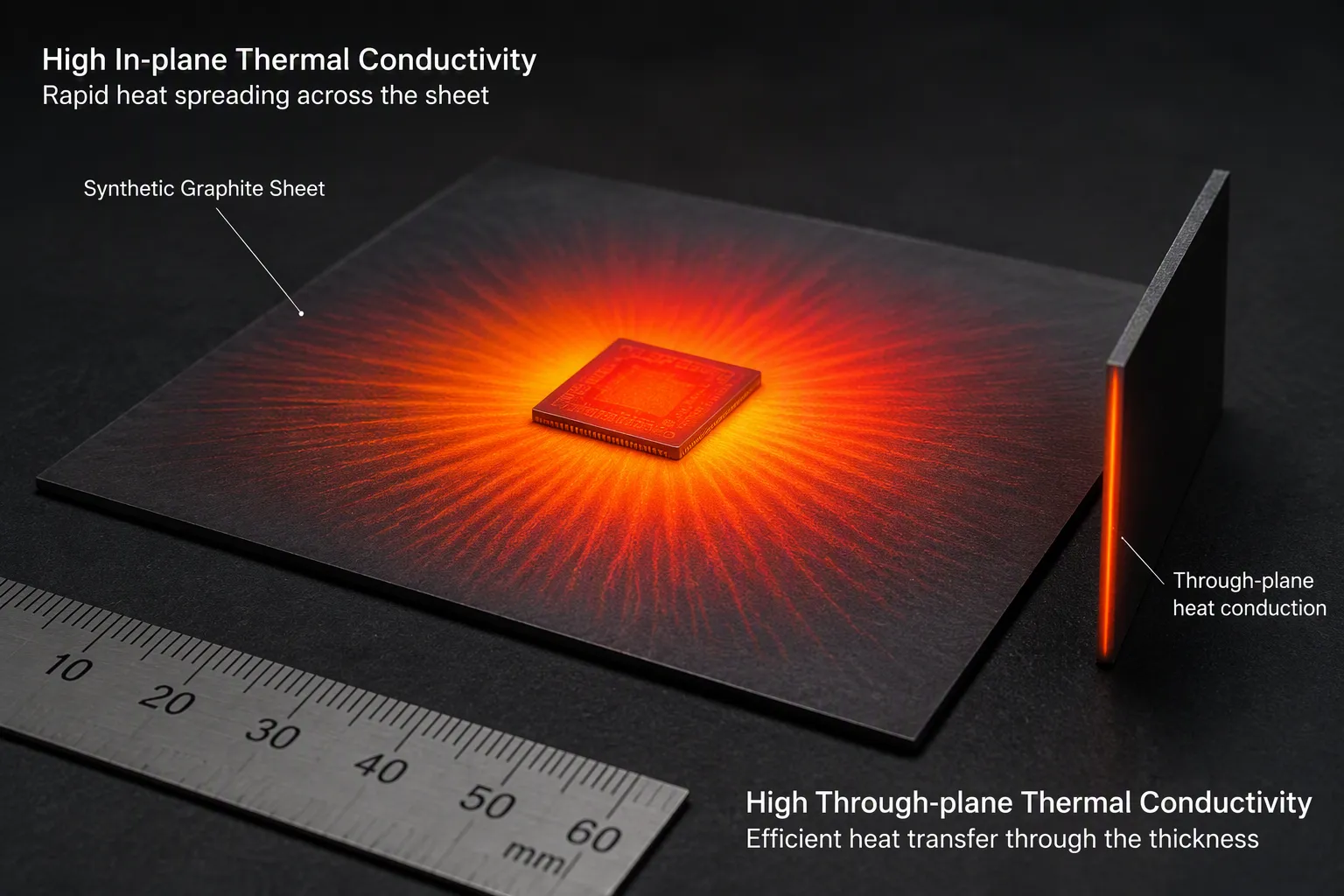
You will see two thermal conductivity numbers on every datasheet. One number tells you how fast heat moves across the sheet. The other number tells you how fast heat moves through the sheet’s thickness. These numbers measure heat flow in two different directions. You must read them right to pick the best material.
In- thermal conductivity shows how fast heat spreads across the sheet’s surface. Good synthetic graphite sheets reach between 600 and 1900 W/m·K in this direction. Through- thermal conductivity measures heat moving through the sheet’s thickness. This value is usually between 3 and 20 W/m·K. The difference between these numbers is very large. Some sheets have a ratio of nearly 500 to 1.
You should check both numbers before you buy. A supplier might only show the big in- number. You also need the through- number. This second number tells you how well heat gets into the sheet from your part. Without good through- performance, heat cannot reach the spreading layer well.
The in- value drives your heat dissipation plan. When a small chip makes a lot of heat, you want that energy to spread sideways fast. A sheet with high in- thermal conductivity spreads the heat across a wide area. This action lowers the temperature at the hot spot.
Through- conductivity matters for a different reason. Heat must first go through the sheet’s thickness before it can spread. If this value is too low, you create a bottleneck. The heat builds up at the entry point instead of moving into the spreading .
You should match the sheet’s properties to your heat flow path. For a CPU that sits right on the sheet, you need balanced performance. The heat enters vertically, then spreads horizontally. Your design works only when both directions work well together. This balance decides the overall cooling efficiency of your thermal solution.
Synthetic graphite sheets come in many thicknesses. You can find products as thin as 0.07 millimeters. Other options go up to 0.3 millimeters or more. Each thickness serves a different purpose in thermal management.
Thin sheets around 0.07mm work well in tight spaces. You can fit them between a display and a battery in a smartphone. They bend easily around curved surfaces. However, thin material has limited heat capacity. You might need multiple layers to get enough heat spreading.
Thicker sheets near 0.3mm have lower thermal resistance. Heat moves through them more easily. These sheets suit applications with higher heat loads. You lose some flexibility when you choose a thicker product. The material becomes stiffer and harder to bend around corners.
Thickness directly affects thermal resistance. A thicker sheet gives a larger cross-section for heat flow. This lowers resistance and improves dissipation performance. You get better heat transfer with less temperature drop across the material.
Thicker sheets also fill gaps between parts. You can use them to bridge the space between a PCB and a metal chassis. The material compresses slightly under pressure. This compression ensures good contact with both surfaces. Better contact means more efficient heat transfer.
You must balance these benefits against the physical limits of your device. A thicker sheet takes up more space. It also weighs more than a thin alternative. Your choice depends on the gap you need to fill and the heat you must move. Measure your available space carefully before picking a thickness.
Flexibility decides where you can use a synthetic graphite sheet. Some applications only need static bending. The sheet bends once during assembly and stays in that position. Other applications involve dynamic bending. The sheet flexes many times as the device opens, closes, or moves.
For static applications, you can choose a slightly stiffer sheet. The material needs to hold its shape after installation. Dynamic applications need a more flexible product. You need a sheet that survives thousands of bending cycles without breaking.
Think about a laptop hinge area. The graphite sheet must flex every time someone opens the screen. This repeated motion stresses the material. You need a product made for this dynamic environment. A sheet meant only for static use might crack after repeated bending.
Bending creates mechanical stress inside the graphite structure. If you bend the sheet too sharply, you risk cracking. The crystal structure can separate along its layers. This damage destroys the thermal path and ruins heat dissipation.
Delamination is another danger. The layers of the sheet can separate from each other. This separation creates air gaps that block heat flow. You lose thermal performance exactly where you need it most.
You should follow the manufacturer's minimum bend radius spec. This value tells you the tightest curve the sheet can handle safely. Do not go past this limit during installation. For dynamic applications, add extra margin to your bend radius. This precaution extends the life of your thermal solution.
You also need to handle the sheets carefully during assembly. Sharp tools or rough edges can damage the material. Use smooth rollers or gentle hand pressure when applying the sheet. Proper handling stops micro-cracks that grow over time. Your attention to these details ensures reliable long-term performance from your artificial graphite sheets.
Not all artificial graphite sheets work the same. You need to pick a grade that fits your device's heat needs. The wrong pick can cause poor cooling or wasted money. This part helps you sort through your choices.
You must choose between two main types. Standard grades give decent heat control at a lower price. High-performance grades move the most heat for tough jobs.
Standard grades spread heat at 600 to 1900 W/m·K. These sheets handle heat from everyday gadgets. Phones, tablets, and laptops often use these grades. The price stays low because making them is easier.
High-performance grades also reach 600 to 1900 W/m·K. These sheets deal with much hotter parts. You find them in EV batteries and 5G base stations. The cost goes up with the power. You pay extra for better heat movement.
Grade Type | Conductivity Range | Typical Applications |
|---|---|---|
Standard | 600–1900 W/m·K | Smartphones, tablets, laptops |
High-Performance | 600–1900 W/m·K | EV batteries, 5G base stations, power modules |
The price gap between these grades can be large. High-performance sheets need finer steps and hotter ovens. Only buy the power you truly need. Picking too much wastes your budget.
The datasheet shows the grade if you know where to look. Find the in- heat number first. That value tells you if it's standard or high-performance. Check the lowest number, not just the top one. Some sellers list a peak that the sheet rarely hits.
Look at the density as well. Higher density usually means better heat flow. Standard grades tend to be less dense. High-performance grades pack more carbon atoms in the same space. This setup lets heat move faster.
You also pick between coated and uncoated synthetic graphite sheets. Each type fits a different need in your cooling plan.
Coated sheets have a thin PET layer on one or both sides. This layer stops electrical flow. You can put the sheet right on live parts without shorts. The coat also makes the sheet easier to handle.
But this extra layer slows heat. PET does not move heat well. It blocks some heat from reaching the graphite core. You lose some of your heat transfer power. The coat also makes the sheet thicker and less bendy.
Use coated sheets when you need electrical safety. The protection beats the heat loss in many designs. Your build gets easier without extra insulation parts.
Bare sheets have no coat at all. Heat goes straight into the material with no block. You get the full heat movement the sheet can give. This choice works best when you control the electrical area.
Make sure the sheet never touches live parts. A short could ruin your device. You also must handle the sheet with care. Bare sheets can drop tiny bits when cut or bent.
For the best heat flow in a safe setup, bare sheets win every time. Your pick depends on your safety needs. Check the risk before you choose the coated type.
You now know the key numbers and types. The next step is picking the right material for your heat problem. Every device moves heat in its own way. Your job is to put the right sheet in the right place. This section helps you make that choice with confidence.
Synthetic graphite sheets do two main jobs. One job spreads heat from a small source. The other job fills a space between parts. These jobs need different material features. You must know which job you have before you buy.
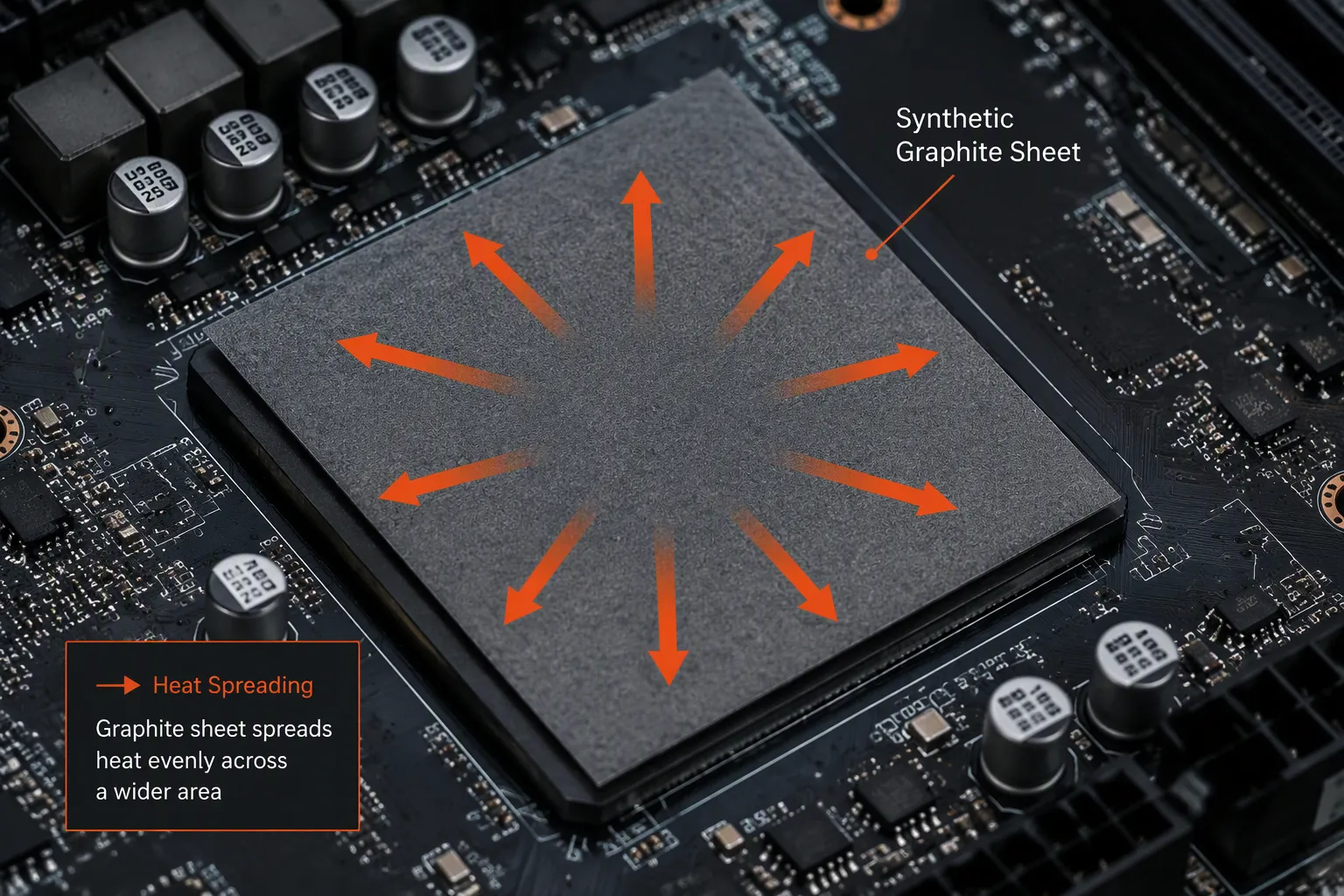
A processor chip makes a lot of heat in a tiny area. You need to push that heat outward fast. This job needs high in- thermal conductivity. The sheet takes heat from the chip and spreads it over a wide surface. This action lowers the temperature at the source.
You want the thinnest sheet that still spreads heat well. Thin sheets give the best in- values. A 0.07mm sheet moves heat faster along its surface than a thicker one. You also get more flexibility for tight spaces.
Place the sheet right over the hotspot. Make sure the whole hot area touches the material. Any gap between the chip and the sheet blocks heat flow. You may need a thin thermal interface material to fill tiny air pockets. This setup makes sure maximum heat enters the spreading layer.
The goal is simple. You turn a small, dangerous hotspot into a broad, safe temperature zone. Your heat sink or chassis then removes the heat from the larger area. This two-step process keeps your chip safe.
Sometimes your problem is not a hotspot. You have a space between two parts that need thermal contact. A printed circuit board sits above a metal chassis. Air fills the space between them. Air blocks heat flow. You need a material to fill that gap.
This job needs a different approach. You focus on thickness and compressibility over raw spreading power. A thicker sheet fills the vertical space. Compressibility makes sure the material presses firmly against both surfaces. Good contact means efficient heat transfer.
Synthetic graphite sheets compress well for this exact purpose. The material squishes slightly under mounting pressure. This compression creates better thermal coverage across the whole contact area. You get reliable gap filling even on crowded electronic boards where parts create uneven surfaces.
You must measure your gap carefully. The sheet needs enough thickness to touch both surfaces. Too thin means no contact. Too thick means you cannot close your device. Pick a sheet that compresses 7 to 30 percent under your mounting force. This range gives you a secure fit without too much stress.
Your device design decides how heat must flow. You also face physical limits on where the sheet can go. Knowing these limits helps you choose the right product.
Heat moves differently through a synthetic graphite sheet based on direction. You must know which direction matters for your use. This knowledge shapes your material choice.
Horizontal heat transfer happens along the sheet's surface. This direction is called the X-Y axis. Synthetic graphite sheets do great here. You get horizontal thermal conductivity between 1200 and 1900 W/m·K. Thinner sheets reach the higher end of this range. This performance makes them ideal for spreading heat across a board.
Vertical heat transfer moves through the sheet's thickness. This direction is called the Z axis. The material performs much weaker here. You get vertical thermal conductivity between 10 and 20 W/m·K. Thicker sheets reach the higher end. This value matters when heat must pass through the sheet to reach a heat sink below.
Most designs need both directions to work. Heat enters vertically from a chip. Then it spreads horizontally across the sheet. You must balance your priorities. A thin sheet spreads heat faster sideways. A thick sheet moves heat through its thickness more easily. Your specific heat path decides the right choice.
Modern electronics rarely have flat, simple surfaces. You often need to wrap a sheet around a battery cell. You might need to follow a curved chassis wall. Your sheet must bend without breaking.
Flexibility becomes your key need in these cases. A sheet that cracks during installation fails completely. The thermal path breaks. Your heat dissipation solution stops working.
Consider a 0.07mm synthetic graphite sheet. This material handles tough bending conditions. It survives 10,000 cycles of 180-degree bending at a 5mm radius without failure. This durability supports use in compact, moving environments. You can wrap it around tight curves with confidence.
The 0.07mm sheet passes 10,000 cycles of 180° bending at a 5mm radius without failure. This flexibility makes it suitable for curved surfaces and moving parts.
You should test your specific bend radius before committing to a design. Draw your curve on paper. Measure the radius. Compare it to the sheet's rated capability. Add a safety margin for repeated motion. This step prevents failures in the field.
Your assembly process also matters. Use smooth tools when applying the sheet. Avoid sharp edges that could cut the material. Apply even pressure across the surface. These steps stop micro-damage that grows over time.
The right synthetic graphite sheet fits your device like a second skin. It follows every curve. It fills every gap. It spreads heat exactly where you need it. This level of integration makes artificial graphite sheets a top choice for modern thermal management challenges.
Your cooling strategy depends on matching material features to physical realities. Take time to map your heat path. Measure your available space. Understand your bending needs. This analysis leads you to the right product. You avoid costly mistakes and get reliable performance.
You need to pick how to attach your synthetic graphite sheet. The adhesive you choose affects heat performance, how fast you can assemble parts, and how long the setup lasts. You have two main choices: a sheet with adhesive already on it, or a dry sheet used with a separate thermal interface material (TIM). Each choice has pros and cons you must think about.
Most suppliers sell synthetic graphite sheets with pressure-sensitive adhesive (PSA) already on them. This setup makes assembly easier. You peel off a liner and stick the sheet onto your part. You do not need extra steps to apply glue or wait for it to cure.
PSA-backed sheets cut down production time. You skip the step of adding a separate adhesive layer. This option works well for fast assembly lines. The adhesive keeps the sheet pressed firmly against your heat source.
You lose a bit of heat performance for this ease. The adhesive layer adds resistance between the sheet and your part. Heat must pass through this extra layer before it reaches the graphite core. A typical PSA layer lowers total heat transfer to some degree. You give up some cooling power to make assembly simpler.
Pick PSA when your production speed matters more than getting the last bit of cooling. Consumer electronics and everyday devices often do well with this trade-off.
Sometimes you need the best heat movement possible. In those cases, a dry sheet with a separate TIM works better. You put a thin silicone thermal pad or grease between your part and the bare graphite sheet. This TIM fills tiny air gaps without the extra resistance of a thick adhesive layer.
You get more control over heat resistance. You can pick a high-quality TIM with very low thermal impedance. The result is a cleaner path for heat to travel from the chip into the graphite spreader.
This method adds assembly steps. You must apply the TIM on its own. You must line up the dry sheet with care. But for high-power uses like EV battery packs or server power modules, the extra work pays off with better cooling.
If you go with a pre-applied adhesive, you must choose the right tack level. Adhesive strength ranges from low-tack to high-tack. Your pick depends on whether you need to take the sheet off later.
High-tack adhesives form a strong, lasting bond. The sheet stays put through shaking, temperature swings, and normal use. You cannot remove it without harming the sheet or the part. This option fits devices that will not be opened for service or repair.
Low-tack adhesives let you peel the sheet off cleanly later. You can swap out the thermal solution during testing or field repairs. Use this option when your design might change or when the device needs service access.
A medium-tack adhesive gives you a middle ground. You get good holding strength during normal use but can still remove the sheet with some effort. This choice works well for prototypes and low-volume products that may need changes.
All adhesives release small amounts of gas over time. This release is called outgassing. The gases can settle on nearby lenses, sensors, or electrical contacts. Such buildup can cause failures in sensitive devices.
You should check the adhesive's outgassing specs. Look for low total mass loss (TML) and low collected volatile condensable materials (CVCM). These numbers follow ASTM E595 testing standards. Pick an adhesive with values that match how sensitive your device is.
For open-frame designs with no sealed case, outgassing matters less. For sealed devices with sensitive parts, you need the lowest-outgassing adhesive you can find. Some uses may need a dry sheet with a non-silicone TIM instead of any adhesive at all.
Your final pick balances heat performance, assembly ease, and reliability needs. The right option keeps your device cool while staying dependable over time.
High-performance synthetic graphite sheets are premium products with a higher price. You must decide if the extra cost brings real value to your device. The right balance between cost and performance decides your final choice.
You need a clear budget for your thermal solution. The cheapest sheet is not always the best value. A well-chosen sheet can replace heavier copper heat sinks. This replacement reduces system weight and total assembly cost.
Three things control the price of a synthetic graphite sheet.
Thickness: Thicker sheets use more material. They cost more but offer lower thermal resistance.
Conductivity: Higher conductivity requires a more precise process. The price rises with the performance grade.
Coating: A bare sheet costs less than a coated sheet. The added PET layer adds steps and material to the process.
You must weigh these factors against your needs. A thick, high-performance, coated sheet represents the highest cost. A thin, standard, bare sheet offers a lower entry price.
Smart buyers look beyond the unit price. You evaluate the cost per watt of heat dissipation. A sheet that costs twice as much but moves three times the heat is a better value. A sheet that saves system weight and replaces a bulky finned heatsink can reduce total system cost. You should calculate the total system cost. Include the sheet, the assembly time, and any extra parts you need. This calculation gives you a true picture of the value.
Not every device needs the highest grade. You can match the sheet to the heat load. Over-engineering wastes money.
Devices with low heat flux do not need the most expensive material. Natural graphite sheets provide a well-known lower-cost option. The table below shows the typical values:
Material | Thermal Conductivity (W/mK) |
|---|---|
Synthetic Graphite Sheet | 900 ~ 1950 |
Natural Graphite Sheet | 300 ~ 700 |
For simple cooling needs, a natural sheet or a standard synthetic grade works well. You pay less and still get good performance. The key is to match the specification to your thermal budget. Over-specifying performance raises cost without any real return.
Sometimes a metal plate is the simplest and cheapest answer. Copper and aluminum are standard choices. They cost less per gram than synthetic graphite. You can cut and shape them with simple tools. But metals are heavy. They take up more space. You cannot bend them around tight curves. Artificial graphite sheets excel where weight, space, and flexibility matter. If your design has room for a flat metal sheet, copper or aluminum can be the cost-effective choice.
The goal of any thermal management plan is to meet your specific needs at the lowest total cost. You start with your heat load. You check your space constraints. Then you pick the best material for the job. The most expensive sheet is not always the best solution. The right one delivers the heat dissipation you need without breaking your budget.
When you look for a supplier, first check how much they can make and how they control quality. A maker with big capacity can fill your orders on time. A supplier who makes millions of square meters each year, like DASEN, demonstrates that they can handle large orders for your synthetic graphite sheets. You want a partner who gives you the same good material every time.
Capacity tells you how much a supplier can produce. More capacity means more experience and better control. You avoid delays that hurt your schedule. A supplier who makes millions of square meters has proven systems. They have improved their process over many years.
ISO9001 shows they make things the same way every time. The supplier follows written steps for each task. They check raw materials before making the sheets. They test finished products against set standards. They track mistakes and fix what caused them. You get reliable results from every roll. Ask for their ISO certificate when you check them out. That one paper tells you a lot about their focus on quality.
Patents show how much a maker knows about the technology. Each patent solves a real cooling problem. A supplier with many patents spends a lot on research and development. They keep making their materials better. You get improved products that handle more heat.
DASEN has multiple invention and approved patents. This shows they have strong R&D. They own the rights to their own processes. You get to use advanced methods. Their work on new ideas means you get modern cooling solutions.
Always ask for samples before you buy. Datasheets give you the tech details to compare. A good supplier shares both without a problem. Use these tools to check if the material fits your use.
Look at these key numbers on the datasheet:
Thickness (0.1 mm to 0.3 mm)
In- heat movement (300–800 W/m·K)
Through- heat movement (5–15 W/m·K)
Density (1.0–1.3 g/cm³)
Pull strength (≥4.0–6.0 MPa)
Squeeze ability (7–30%)
Electrical resistance (≥1.0×10⁻⊃3; Ω·cm)
Insulation strength (>5 kV/mm)
Working temperature range (-40°C to +400°C)
Each number affects how the sheet works in real life. Thickness controls how much heat the sheet can carry. In- heat movement shows how fast heat spreads across the surface. Density tells you about the internal structure quality. Pull strength shows how much bending the sheet can take. Squeeze ability matters when you need to fill gaps. Compare each number to what your device needs before you decide.
Datasheet numbers come from lab tests. Your actual device is different. You need to test the material in your own setup to be sure it works.
Put the sample between your heat source and heat sink. Measure temperatures at key spots with sensors. Compare results to your target numbers. If they match, you have the right product.
DASEN helps with prototyping to check their sheets in your design. A good supplier gives you full datasheets and testing support. This teamwork keeps you from costly mistakes. A sheet that looks great on paper might not fit your assembly. It might not squeeze enough for your gap. Only real testing shows the truth. Make testing a normal part of how you find suppliers.
Start your selection process by defining your thermal budget and physical constraints. Measure the heat your device generates. Measure the space you have available. These numbers guide every other decision.
Prioritize the key metrics that matter most for your application. Thermal conductivity, thickness, and flexibility form your core criteria. Match the sheet type to your specific job. A heat spreader needs high in- conductivity. A gap filler needs thickness and compressibility.
Choose your adhesive based on assembly requirements. Consider whether you need permanent bonding or re-workability. Then validate your choice with samples from a reliable source. Test the material in your actual device.
The most expensive synthetic graphite sheet rarely delivers the best value. The right one meets your thermal and mechanical requirements at the lowest cost. Start with the datasheet. End with a practical test.
In- conductivity tells you how quickly heat moves across the sheet's surface. High numbers, from 600 to 1900 W/m·K, pull heat away from small hot spots fast. You want this number high when cooling a CPU or power chip. Through- numbers matter less for spreading tasks.
First, measure the space you have. Thin sheets near 0.07mm bend easily and fit into tight spots. Thicker sheets around 0.3mm move more heat but do not bend as well. Match the thickness to your gap size and heat load. If flexibility matters, use several thin layers instead of one thick sheet.
Yes, but you must follow the minimum bend radius. A 0.07mm sheet can handle 10,000 cycles of 180-degree bending at a 5mm radius. Bending sharper than that can cause cracking or layer separation. For moving parts, give yourself extra room beyond the bend radius. Test your exact curve before you finish your design.
Coated sheets have a PET layer that stops electrical flow. This layer slows heat transfer compared to uncoated sheets. Bare sheets move heat better but must stay away from live circuits. Pick coated for electrical safety. Pick bare for the best cooling.
High-tack adhesive makes a permanent bond. You cannot take the sheet off without breaking it. Low-tack adhesive lets you remove the sheet cleanly for repairs or testing. Think about whether your device will need service. For prototypes, go with low-tack. For sealed production devices, high-tack works best.
Standard synthetic graphite sheets typically have in- thermal conductivity ranging from 600 to 1900 W/m·K. They work well for smartphones, tablets, and laptops. High-performance grades also fall within this range but are optimized for more demanding applications like EV batteries and 5G gear. Figure out your heat load first. If your device stays cool with standard material, you save money without losing performance.
Look for ISO9001 certification and production capacity. Ask about patents and R&D spending. Request samples and full datasheets. Test the material in your own device setup. A supplier with high yearly capacity and proven process control, like DASEN, is a reliable choice.
Adhesives let out small amounts of gas over time. These gases can land on lenses or sensors. Check the adhesive's outgassing specs using ASTM E595 standards. Look for low total mass loss values. Sealed devices with sensitive parts need the lowest-outgassing options you can find.