
Views: 0 Author: Site Editor Publish Time: 2026-08-13 Origin: Site


You want to know which is better for your PC build. Many people think graphite sheet vs thermal paste is easier to use. DASEN’s graphite sheet vs thermal paste gives good cooling and works well. It is easy to put in, you can use it again, and it is safe. If you build PCs a lot or change parts, graphite sheet vs thermal paste helps you work faster. Gamers, people who overclock, and regular users all like graphite sheet vs thermal paste. Graphite sheet vs thermal paste is great if you want a fast and clean build.
Graphite pads are simple to put on. You just peel, place, and press them. There is no mess or need for special skills.
You can use graphite thermal pads more than once. This helps you save time and money. You do not have to buy new thermal paste each time.
Graphite sheets move heat better. They help your CPU and GPU stay cool. This is important when you play games or overclock your PC.
Using graphite pads means less risk of spills and mess. Your workspace stays cleaner and you have less trouble when you upgrade.
If you upgrade often, graphite pads make it easier. You can change parts fast and not worry about messy thermal paste.
You want to know how thermal pads vs thermal paste stack up for your PC build. Here’s a quick look at the main points:
Feature | Graphite Sheet (Thermal Pad) | Thermal Paste |
|---|---|---|
Cooling | High efficiency, steady | High efficiency, can be messy |
Ease of Use | Simple, no mess | Needs careful application |
Reusability | Yes, use again and again | No, replace each time |
Safety | Safe if sized right | Can spill, needs care |
Cost | Higher at first, saves later | Lower at first, adds up |
Longevity | Lasts through many upgrades | Needs new paste often |
When you look at thermal pads vs thermal paste, both give strong cooling. DASEN’s graphite sheet stands out for steady heat transfer and high efficiency. You get reliable cooling for gaming, work, or overclocking. Thermal paste can also deliver great cooling, but it depends on how well you apply it. If you want top thermal performance every time, a high-quality pad like DASEN’s is a smart pick.
Thermal pads vs thermal paste feel very different to use. You just place a graphite pad on your CPU or GPU. No mess, no fuss. With paste, you need to spread it just right. Too much or too little paste can hurt cooling. Many people find pads much easier, especially if you build PCs often.
You can reuse a graphite thermal pad many times. This makes it perfect for people who upgrade or swap parts. Paste dries out or sticks, so you must clean and reapply it each time. Pads save you time and effort.
Thermal pads vs thermal paste both need care. If you cut a pad too large, it could touch other parts and cause problems. Always use the right size and thickness. With paste, you might spill it onto sensitive parts or use too much, which can block heat flow. Here are some common mistakes:
Cutting pads too big, risking short circuits.
Using pads with the wrong thickness, causing poor contact.
Reusing pads on different components.
Using too much paste, making a barrier.
Not cleaning old paste before adding new.
Smearing paste onto nearby parts.
Thermal pads vs thermal paste have different costs. Pads like DASEN’s cost more at first, but you can use them again. Paste is cheaper at first, but you need to buy more every time you upgrade or clean your PC. Over time, pads can save you money.
A graphite thermal pad lasts through many builds. It keeps its cooling power and efficiency. Paste dries out or loses its effect, so you need to replace it often. If you want something that lasts, pads win here.
Tip: DASEN’s graphite sheets set the standard for thermal pad performance. You get high efficiency, easy use, and long life in one product.
You want your PC to stay cool, right? The secret is how well your cooling material moves heat away from your CPU or GPU. This is called thermal conductivity. It tells you how fast a material can transfer heat. The higher the number, the better the heat transfer.
Let’s look at how thermal pads and thermal paste compare:
DASEN graphite sheets reach up to 1500+ W/mK in- thermal conductivity. That’s a huge number in the world of thermal transfer.
Most thermal pastes have thermal conductivity between 4 and 12 W/mK. Some premium pastes go a bit higher, but they don’t come close to graphite sheets.
Graphite sheets use a special thermally conductive material. This means you get top heat transfer efficiency. When you use a DASEN graphite sheet, you give your PC a real boost in thermal transfer. You can count on steady performance, even when your system works hard.
Numbers are great, but you want to know what happens in real life. When you use a graphite thermal pad, you get high-performance cooling that keeps your CPU or GPU at safe temperatures. You don’t have to worry about messy application or uneven coverage. The pad sits flat and covers the whole chip, so heat transfer stays strong.
Thermal paste can also give good results if you apply it just right. But if you use too much or too little, you might see higher temperatures. Paste can dry out over time, which means you lose some thermal transfer efficiency. You may need to replace it to keep your system cool.
With a DASEN graphite sheet, you get reliable thermal conductivity performance every time you build or upgrade. You don’t have to guess if you used enough or worry about making a mess. The pad keeps working, so your PC stays cool. This is why many people choose graphite pads for high-performance cooling and long-lasting heat transfer.
Tip: If you want the best heat transfer efficiency and easy installation, try a DASEN synthetic graphite sheet. You’ll see the difference in your PC’s temperature and performance.
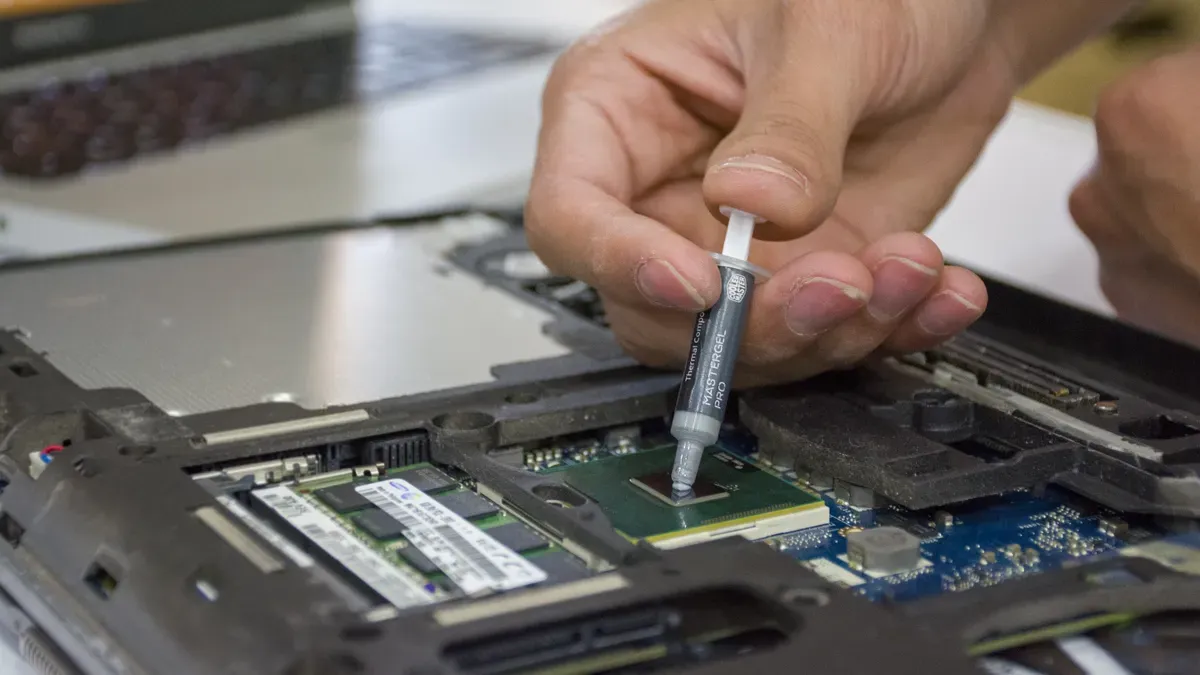
Image Source: pexels
You want your PC build to go smoothly. The application process for thermal pads and thermal paste feels very different. With DASEN graphite pads, you follow a simple routine:
Clean the surface to remove dust and oil.
Peel off the release film from the pad.
Place the pad on your CPU or GPU, making sure it covers the area.
Press the heat sink onto the pad.
You finish in just a few steps. The pad sits flat and covers the chip. You do not need to worry about spreading or measuring. Thermal paste application takes more time. You must squeeze the paste, spread it evenly, and check for gaps. If you want thermal paste for optimal performance, you need to be careful. Sometimes, you have to redo the process if you make a mistake.
Thermal pads keep your workspace clean. You do not deal with sticky paste or stains. When you upgrade or change parts, you just lift the pad and reuse it. Thermal paste application can get messy. You might spill paste on your hands or motherboard. Cleaning old paste takes patience. You need alcohol wipes and extra time. If you want a fast and tidy build, pads win.
If you are new to PC building, you want something easy. DASEN graphite pads make installation simple. You do not need special tools or skills. The pad fits right in place. You save time and avoid mistakes. Thermal paste application can feel tricky. You must learn how much paste to use and how to spread it. Many beginners worry about getting it right. Pads help you build with confidence.
Tip: DASEN graphite pads offer easy installation and reusability. You spend less time on thermal management and more time enjoying your PC’s performance.
Feature | Thermal Pads | Thermal Paste |
|---|---|---|
Ease of Application | Easy to install, pre-cut | Needs careful spreading |
Installation Time | Quicker due to simple peel-and-stick method | Longer due to the need for careful application |
Upgrading your PC should be simple. Graphite pads help with this. You can use a graphite pad again and again. It keeps working well and does not change. You do not need to worry about it drying out. DASEN graphite pads are easy to take off and put back on. This is great if you change parts or upgrade a lot. You save time and do not need to buy new pads each time.
Graphite pads can be used many times.
They keep working and do not dry out.
You can take them off easily for upgrades.
Tip: If you build PCs often, using a reusable thermal pad helps you finish faster and keeps your PC cool.
Thermal paste works, but you must replace it every time you take off your cooler. Paste dries up and stops working as well. You have to clean off old paste and put on new paste for each upgrade. This takes more time and can be messy. If your PC gets hot or you want top performance, you should change thermal paste every 6–12 months. For gaming PCs, changing paste every 1–2 years is good. If you upgrade parts a lot, this can cost more.
Thermal paste needs to be put on again after each removal.
Paste dries up and stops working well.
You must clean and add new paste for every upgrade.
People who upgrade often like graphite pads because they are easy. You do not waste time cleaning or spreading paste. You just lift the pad, change your parts, and put it back. The pad keeps working and stays strong. You get good cooling every time. DASEN graphite pads make upgrades quick and easy.
Graphite pads are great for changing parts.
They keep working for a long time.
You save money and time by reusing pads.
If you want easy upgrades and steady cooling, graphite pads are a smart pick.
You want your PC to run safely. Safety matters when you pick a thermal solution. Graphite thermal pads, like DASEN’s, do not conduct electricity if you use the right size and keep them away from other parts. You avoid short circuits by making sure the pad fits only on the chip. Thermal paste can be tricky. Some pastes have metal in them, so they might conduct electricity. If paste spills onto your motherboard, it can cause problems. Always check the label before you use any thermal paste.
Spills can happen during installation. You do not want thermal paste on your hands or inside your PC. Paste can drip or smear if you squeeze too much. It sticks to surfaces and takes time to clean. Graphite thermal pads stay in place. You just lay them flat, and they do not make a mess. You avoid sticky spills and keep your workspace clean. DASEN’s pads help you build with confidence and keep your PC safe.
You want your thermal management routine to be safe and easy. Here are some tips for handling DASEN graphite pads:
Wash your hands or wear gloves before touching the pad. Clean hands keep the pad free from dirt and oil.
Clean the chip surface before you place the pad. This helps with thermal contact and keeps your PC running cool.
Lay the pad flat on the chip. Press gently so it touches well. Do not fold or tear the pad.
Avoid making dust. Dust can cause shorting in electrical parts.
Work in a space with good airflow if dust appears.
Do not breathe in dust or fumes. Keep the pad away from your skin and eyes.
Wear a dust mask and safety glasses if needed.
Store graphite pads in a dry, sealed container. Keep them away from strong chemicals.
Note: DASEN cares about your safety and thermal management needs. The company follows strict quality standards to give you reliable thermal solutions for your PC builds.
You get safe, clean, and easy thermal management with DASEN graphite pads. You protect your PC and boost performance without worry.
You probably notice the price difference right away. When you buy a thermal pad like DASEN’s graphite sheet, you pay more at first. Thermal paste costs less for a single tube. If you build one PC, paste seems cheaper. If you want a quick fix, paste works. Pads cost more because they use advanced materials for better thermal transfer. You get a high-quality product that lasts.
Product | Upfront Cost | Reusability | Mess-Free |
|---|---|---|---|
Thermal Pad | Higher | Yes | Yes |
Thermal Paste | Lower | No | No |
Think about the future. You might upgrade your PC or change parts. Every time you do, you need new thermal paste. That means more money and more work. A DASEN graphite thermal pad stays strong. You reuse it for many builds. You save money over time. You also save time because you skip the cleaning and reapplication steps. Pads give you steady thermal performance for years.
Tip: If you plan to upgrade or swap parts, a reusable thermal pad pays off in the long run.
Reusability changes everything. You lift the pad, swap your CPU or GPU, and put it back. You don’t buy new pads each time. You avoid sticky paste and messy cleanup. DASEN’s thermal pads make your build faster and cleaner. You get reliable thermal contact every time. If you build PCs often, pads help you finish more projects with less hassle.
Reusable pads save money.
You spend less time on thermal management.
You enjoy better performance and cleaner builds.
Note: DASEN’s thermal pads offer a smart solution for anyone who values easy upgrades and long-lasting thermal efficiency.
You want your games to run smooth and fast. Your cpus and gpus work hard when you play. A good thermal solution keeps them cool. Graphite pads help your cpus and gpus stay at safe temperatures. You do not have to worry about messy paste or tricky cleanup. You just place the pad and get back to gaming. DASEN graphite pads give you steady thermal contact, so your microprocessors can handle long gaming sessions.
You push your cpus and gpus to the limit. Overclocking means more heat. You need a thermal material that keeps up. Graphite pads, especially carbon fiber types, transfer heat better than paste. They stay stable even when your microprocessors get hot. You get less thermal resistance, so your cpus and gpus keep their performance. Pads also fill tiny gaps, which means fewer thermal spikes and less throttling. You can trust your system to stay cool during heavy overclocking.
Carbon fiber pads transfer heat better than paste.
Pads stay stable at high temperatures.
Less thermal resistance helps your cpus during overclocking.
Pads fill micro gaps, so you see fewer thermal spikes.
You want your pc to work well for school, work, or fun. You may not change parts often. A graphite pad gives you easy thermal management. You do not need to learn how to spread paste. You just place the pad on your cpus and close your pc. It lasts a long time and keeps your microprocessors cool. You get peace of mind with less effort.
You like to swap cpus or gpus often. You want a thermal solution that saves time. DASEN graphite pads make upgrades simple. You lift the pad, change your parts, and put it back. No sticky mess. No extra cost each time. Pads keep their thermal contact and protect your pc.
Benefit | Description |
|---|---|
Consistent Thermal Contact | Pads fit uneven surfaces for strong heat transfer. |
Electrical Insulation | Pads help prevent short circuits and absorb shocks. |
Long-Term Stability | Pads resist pump-out, so they are easy to install and maintain. |
Tip: If you want easy upgrades and reliable thermal performance, DASEN graphite pads are a smart choice for your cpus and gpus.
You want your PC to work well. Graphite pads are good for most people. They give steady thermal contact and are easy to install. They last a long time and keep your PC cool. You get strong cooling and save time when you upgrade parts. DASEN graphite pads help your PC stay safe.
Think about what you need. If you want simple cooling and good performance, try a DASEN graphite pad. You will see your PC stay cooler and your build will be cleaner.
Pick the best cooling for your PC.
Get better control and easy upgrades.
Yes, you can reuse a graphite thermal pad. Just lift it off and place it back when you upgrade or swap parts. It keeps working well for many builds.
Graphite pads are safe if you use the right size. Make sure the pad covers only the chip. Avoid touching other parts to prevent short circuits.
You get steady performance with graphite pads. Thermal paste works well, but you must apply it carefully. Pads offer reliable cooling every time.
No, you do not need special tools. Clean the chip, peel the pad, and place it. The process is simple and quick.
Most graphite pads come in different sizes. Check your chip size before buying. You can cut the pad to fit if needed.